Most people who struggle to post consistently don't have an ideas problem. They have a conversion problem: one decent idea has to become a LinkedIn post, a short thread, a caption, a video script and a newsletter blurb, and that reformatting eats the week. AI is very good at the reformatting. It is much worse at the parts that make content worth reading. This guide lays out a workflow that uses each for what it is good at, and backs the key steps with what current research and platform documentation actually say.
A note on evidence before we start: a lot of the "content marketing statistics" circulating in 2026 are recycled through aggregator sites, and several of the most eye-catching ones (huge ROI lifts, big-brand case studies) trace back to nothing checkable. I use figures here only where I could tie them to a named survey, a study, or a platform's own documentation, and I flag where the sourcing is thin. The sources are listed at the end.
What the data says about AI and content in 2026
Adoption is near-universal. Summaries of HubSpot's 2026 State of Marketing research put AI use for content creation at roughly 80% of marketers, and about three in four marketers use it for media production. Another survey cited by the CMO Survey puts it at 73.9% of companies. Exact numbers differ by sample, but the direction is not in doubt.
The bottleneck has moved. The same HubSpot-derived figures show the real problem is no longer producing content. About 53% of marketers say they struggle to stand out in an AI-saturated market, and roughly 52% believe AI has made content so easy to create that it is less effective overall. HubSpot's own marketing leadership has described the situation bluntly: more content is now generated by AI than by humans, but most of it is average, and audiences are tuning out content that reads as machine-made.
Time savings are real but modest per piece. HubSpot's generative AI research points to roughly three hours saved per piece of content for creators. That is meaningful across a week of posts, but it is a saving on drafting, not on thinking.
Measurement lags behind use. One vendor benchmark report (treat it as indicative, since the vendor sells content services) found that only about 19% of teams track AI-specific KPIs even though most use AI daily. Translation for a solo creator: most people using AI for social content have no idea whether it is helping.
Audiences are not neutral. A 2026 Gartner figure, as reported by a marketing-statistics roundup, says about half of U.S. consumers would prefer brands that don't use generative AI in consumer-facing content. Read it as a warning about tone and disclosure, not as a reason to avoid AI.
How common is repurposing? Published figures vary wildly. One 2026 roundup says only about 35% of marketers actively repurpose across channels; another says 48% of social marketers do. Claims that repurposing lifts ROI by large percentages, or that a famous streaming company saw a specific engagement jump from AI repurposing, appear on aggregator pages without primary sources, so I would not quote them. What is safe to say: it is widely practiced, and the operational challenge is workflow design rather than awareness.
The takeaway shapes everything below. If production is cheap and differentiation is scarce, your workflow should spend AI on production and spend your own time on the thing that is scarce: a specific point of view.
The core principle: repurpose the idea, not the text
The weakest version of repurposing is pasting one post into five platforms with minor trims. Audiences who follow you in more than one place notice, and platforms increasingly reward content that reads as native.
The stronger version is to treat one idea as a small bundle of different angles and give each platform a different one:
- The claim: your core argument in one sentence.
- The story: a specific moment that shows the claim in action.
- The objection: the strongest reason someone would disagree, and your answer.
- The how-to: the smallest practical step someone could take today.
- The result or reflection: what happened when you or someone you know tried it.
Five angles on one idea read as depth. Five copies of one paragraph read as filler.
Step 1: Write the idea brief (this is the part AI cannot do)
Before opening any AI tool, write a short brief of roughly 150 words. It should contain:
- The claim in one specific sentence. "AI is changing content" is not a claim. "A freelance writer who drafts with AI in half an hour and spends the rest of the time fact-checking and adding opinion delivers faster without losing quality" is.
- Who it is for and what they currently get wrong or struggle with.
- One real detail only you have: a number from your own work, a client situation (anonymized), a mistake you made.
- Your actual opinion, including where you disagree with conventional advice.
- A voice sample: two or three of your own past posts that sound like you.
The real detail and the voice sample are what make the output yours. Everything the model produces without them regresses to the average of the internet, which is exactly the "mostly average" content HubSpot's team is warning about.
Step 2: Generate angle-specific drafts, not generic variations
Give the model the brief, one angle, and one platform per request. Run them as separate prompts so each draft gets full attention. A reliable prompt skeleton:
- Role and context: "You are helping me draft a post in my voice. Here is my brief and three samples of my writing."
- Angle and platform: "Write the objection angle as a LinkedIn post."
- Constraints: length, reading level, number of paragraphs, what to end on.
- Guardrails: "Use only facts and numbers that appear in my brief. If you want to add a statistic, mark it as [NEEDS SOURCE] instead of inventing one."
That last guardrail matters more than it looks, as Step 4 shows. Ask for two or three alternatives of the opening line only. Hooks are where AI drafts are most generic, and choosing among options is faster than rewriting.
Step 3: Edit to each platform's real constraints
Platform limits and layout details are checkable facts, and drafts that ignore them get truncated or rejected. The table below reflects third-party trackers last verified around mid-2026. Platforms change these, so confirm against the app before you schedule.
| Platform | Hard limit | What readers see first | Notes |
|---|---|---|---|
| X | 280 characters (free tier) | Whole post | Count manually; don't trust the model's count |
| Threads | 500 characters | Whole post | One topic tag per post |
| Bluesky | 300 characters | Whole post | |
| 3,000 characters | Roughly the first 140 characters on mobile before "see more" | The hook has to fit above the fold | |
| 2,200 characters | About the first 125 characters before "more" | Hashtags count toward the limit |
A conflicting detail worth knowing about: Instagram's hashtag allowance. Many guides still say 30 per post across caption and comments. At least one 2026 tool tracker reports that Instagram began rolling out a five-hashtag cap in December 2025, with older accounts possibly still seeing the old allowance. Sources disagree, so check what your own app lets you do. Either way, a handful of relevant tags is the sensible target.
Platform-specific editing checklist:
- LinkedIn: move your best sentence into the first line, cut corporate filler, and make sure the closing question is one your audience would actually answer.
- X and Threads: read each post aloud; if it sounds like a press release, rewrite it. Verify character counts yourself.
- Instagram: lead with the hook inside the first 125 characters, then write for saves and shares rather than likes.
- Short video: read the script aloud against a timer. Models routinely overwrite, so expect to cut. Write for the ear, not the eye.
Step 4: Verify every factual claim
This step is where AI-assisted content most often goes wrong, and the research on why is consistent.
Studies of fabricated references show the problem is real but varies by model and task:
- In a widely cited 2023 study, about 55% of citations from GPT-3.5 and 18% from GPT-4 were entirely fabricated, and many of the remainder had errors in details such as volume or page numbers.
- A 2025 comparison of eight chatbots found six of them invented a substantial share (about 40% on average) of the academic references requested, though rates have been falling for some models; Gemini's fabrication rate dropped from 100% in 2023 to around 12% in that study.
- A finance-focused study found GPT-4o fabricating roughly one in five citations.
- On a different measure, the Vectara leaderboard of grounded summarization shows hallucination rates ranging from about 1.8% to 24.2% across 106 models as of May 2026.
Those studies mostly measure citations and summaries, not social posts, so don't over-read them. But the lesson transfers: models produce fluent, specific-sounding numbers and names whether or not they are true, and the errors are not evenly distributed. Narrow, recent or niche topics are worse.
A practical routine:
- Highlight every number, date, name, quote and "studies show" in every draft.
- For each, find the primary source (the report, the platform's help page, the company's own announcement), not another blog repeating it.
- If you cannot find it in ten minutes, cut it or rephrase it as your own experience.
- Keep a short log of what you checked. It also doubles as your source list if someone asks.
Step 5: Know the disclosure and detection landscape
If your workflow only uses AI for captions and scripts, the rules are lighter than if you generate images or video. Still, 2026 changed the environment enough to deserve attention.
- Automatic labeling is now the default. Meta applies "AI info" labels on its own to media it identifies as AI-generated or AI-edited, and TikTok does similarly using embedded provenance markers (C2PA Content Credentials). YouTube expanded automatic detection and made disclosure labels more prominent in May 2026.
- Text is treated differently from media. LinkedIn and X had no dedicated AI label for text as of late 2026 reporting, and platform guidance generally excludes everyday assistance such as AI-generated captions from labeling requirements. Realistic synthetic images, voices and video are the high-risk category.
- Low-effort AI content has consequences. YouTube terminated 16 channels in January 2026 under its "inauthentic content" policy, and LinkedIn added an option on 30 July 2026 for users to flag posts that look like low-effort AI output.
- Most people aren't labeling consistently. A September 2026 Metricool survey of social professionals found only about one in ten always label AI content.
The practical rule: don't use AI to fabricate realistic people, quotes or events, label synthetic media where the platform asks, and make sure text posts contain something a template could not produce.
Step 6: Schedule, then protect time for the human part
Free schedulers are good enough for a one-person workflow, but read the limits carefully, because they are often misunderstood.
Buffer's free plan, per its 2026 pricing coverage, allows three connected channels with ten scheduled posts per channel in the queue at one time. This is a queue cap, not a monthly cap: a slot reopens when a post publishes. At one post a day on a channel, ten slots is about ten days of runway, which is plenty for a weekly batch. Paid plans start around $5 per channel per month. Two further wrinkles reported by reviewers: free analytics history is short (about 30 days), and there is a lifetime cap on how many unique channels you can connect on the free tier. Competing free plans exist with different trade-offs, and some exclude X or LinkedIn entirely, so check that your platforms are supported before committing.
Native schedulers (YouTube Studio, LinkedIn's own scheduling, Meta's tools) are free and have no such queue limits.
A sample week from one idea
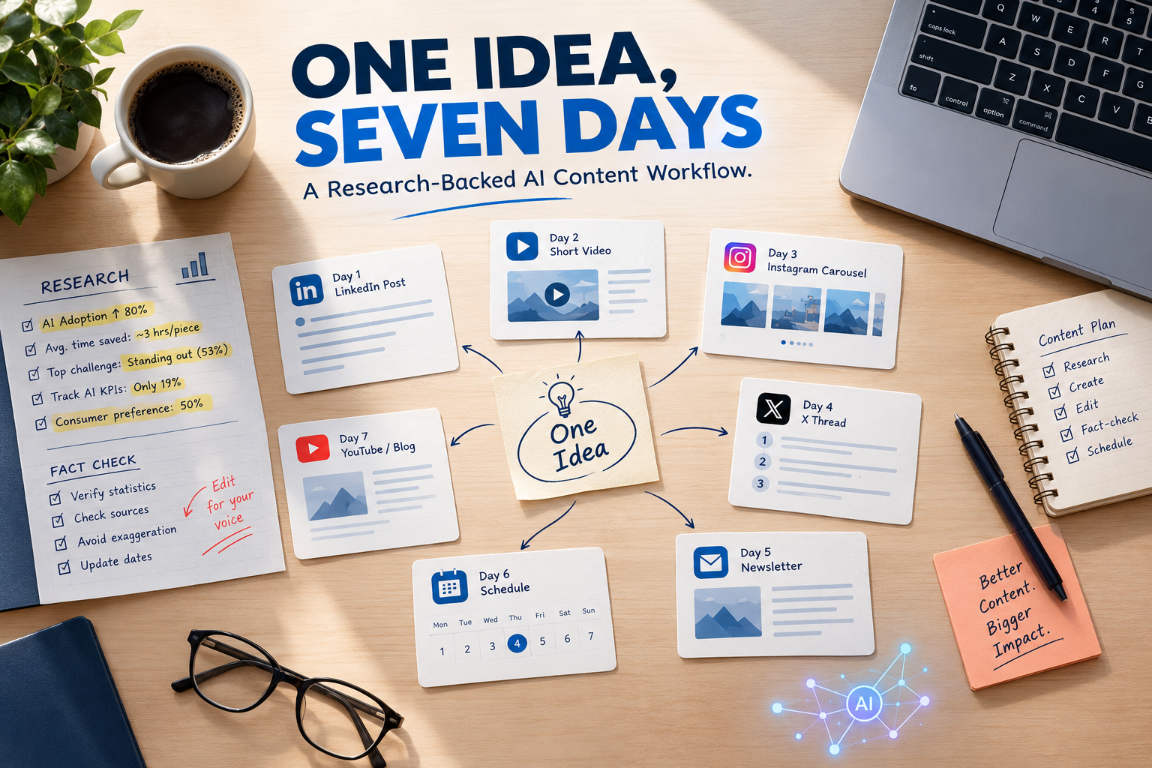
Here is how the angles map to days. Adjust to your platforms and your audience's habits.
| Day | Platform | Angle | Human work |
|---|---|---|---|
| Monday | Brief + drafting session | All five angles drafted | Write the brief; choose the best hooks |
| Tuesday | The claim, with your one real detail | Rewrite the opening line yourself | |
| Wednesday | X or Threads | The objection and your answer | Trim to the character limit by hand |
| Thursday | Instagram or carousel | The how-to, in steps | Design visuals; write the save-worthy CTA |
| Friday | Short video | The story | Time the script; record in your own words |
| Weekend | Newsletter or blog | The result or reflection | Add what you learned from the week's replies |
Schedule the Tuesday to Friday posts in one sitting, then spend the week replying to comments. Replies are where you learn which angle landed, and that learning is the input to next week's brief.
What this workflow does not replace
- A point of view. AI can rephrase an opinion; it can't have one for you.
- Audience knowledge. You know which objections people actually raise in your replies and DMs.
- Editorial judgment. The difference between a post that sounds like you and one that sounds generated is mostly small edits that require taste.
- Strategy. Reviewing what performed, and why, is still a human job, and as the measurement gap above shows, most people skip it.
Tools (check current pricing and limits before relying on them)
| Need | Options | Notes |
|---|---|---|
| Drafting | Any general-purpose chat assistant | Free tiers and model access change often; verify what you get today |
| Scheduling | Buffer (free: 3 channels, 10 queued posts each), native platform schedulers | Check X and LinkedIn support on other free plans |
| Visuals | Canva | Free tier exists; AI-generated imagery may trigger platform labeling |
| Idea and brief storage | Google Docs, Notion, plain text | Keep your voice samples here |