AI tools can save hours when you are preparing revision notes — but only if you use them correctly. This guide walks through a practical workflow for turning dense study material into focused notes, practice questions, and checklists. It also covers what AI gets wrong, so you can catch errors before they cost you in an exam.
What you will need
- Your study material: a PDF, a scanned page photo, or text you can paste.
- A free AI tool such as ChatGPT (free tier), Google Gemini, or Microsoft Copilot.
- About 20 minutes per topic to review and clean up the output.
No paid subscription is required for this workflow.
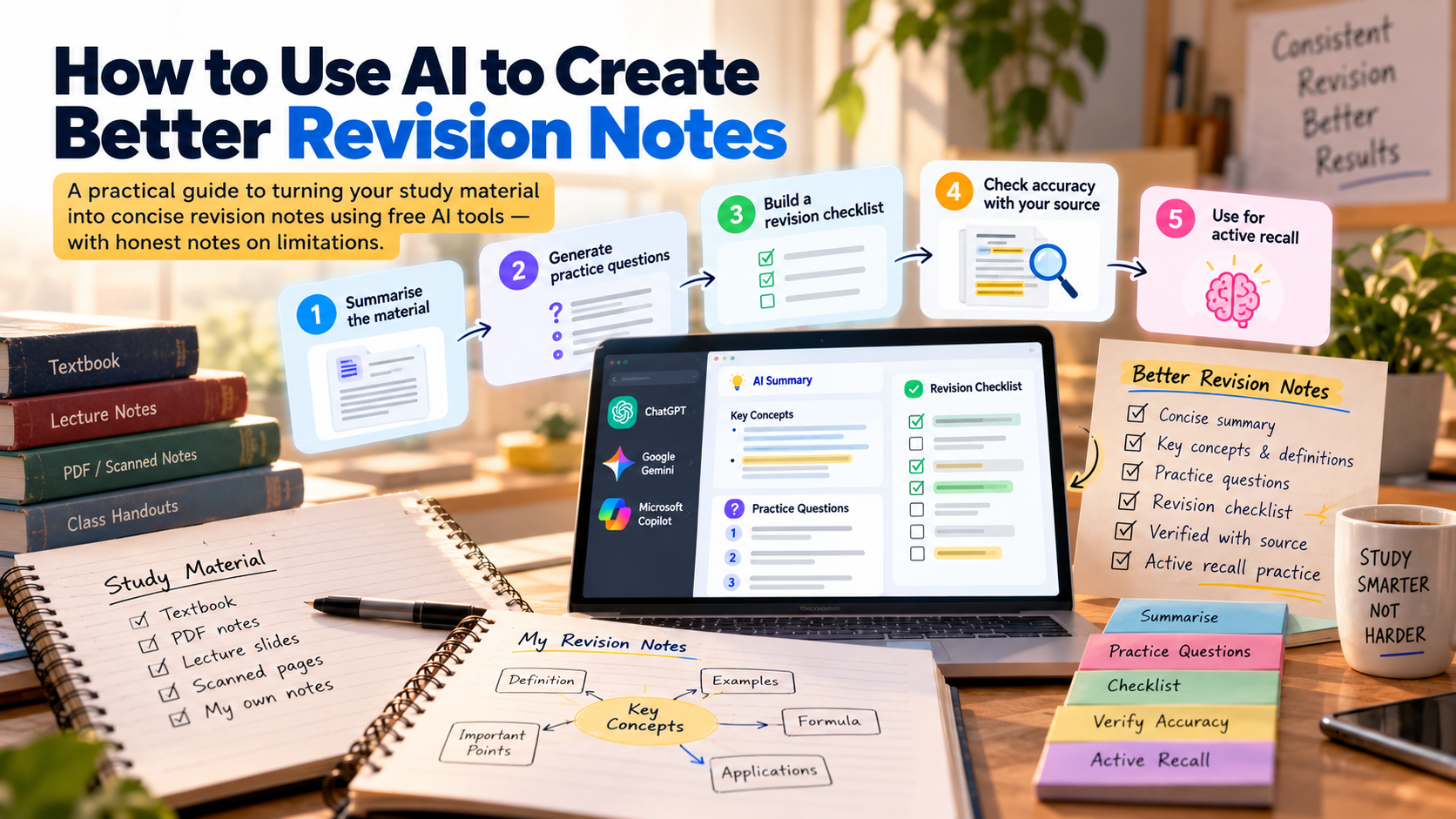
Step 1: Summarise the material
Paste a section of your textbook or notes into the AI and use a specific prompt rather than a vague one.
Less effective prompt:
Summarise this chapter.
More effective prompt:
Summarise the following text in simple English. Use short paragraphs. Focus on the key concepts and definitions. Avoid adding anything that is not in the original text.
Paste up to 1,000–2,000 words at a time. Longer inputs tend to produce less focused summaries.
What to watch for: AI tools sometimes condense too aggressively and drop important qualifications — for example, turning "most metals conduct electricity" into "all metals conduct electricity". Always compare the summary against the original source.
Step 2: Generate practice questions
Once you have a summary you are happy with, ask the AI to generate questions from it.
Example prompt:
Based on the summary above, write 8 short-answer questions that could appear in an exam. Include 2 application questions that ask me to use the concept in a new situation.
Review each question. Remove any that seem ambiguous or that test trivial details rather than understanding.
Note: The quality of AI-generated questions varies. Some questions will be genuinely useful; others will be too easy or will test the wrong things. Treat the output as a starting draft, not a finished revision resource.
Step 3: Build a revision checklist
A simple checklist of key concepts helps you track what you know confidently and what needs more work.
Example prompt:
From this summary, create a checklist of the 10 most important concepts, facts, or skills a student must be able to recall or explain. Format it as a simple numbered list.
Copy the checklist into your notes app (Notion, Obsidian, a paper notebook — whatever you use). Before an exam, work through the list and mark each item as confident, shaky, or unsure.
Step 4: Check accuracy against your source material
This step is non-optional.
AI tools occasionally:
- Confuse similar terms or definitions.
- Add plausible-sounding but incorrect examples.
- Omit important exceptions or nuances.
- Blend information from different topics.
Spend a few minutes comparing your AI-generated notes against the original textbook or lecture slides. Correct any discrepancies directly in your notes and note the source of truth.
Step 5: Use the notes for active recall
Static notes — even well-written ones — are not revision. Revision means retrieving information from memory.
Use your AI-generated practice questions as a self-testing tool:
- Cover the summary.
- Read each question.
- Write or say your answer from memory.
- Check your answer against the summary.
This retrieval practice is significantly more effective than re-reading notes, according to research in cognitive psychology (see Roediger & Karpicke, 2006).
Limitations to be aware of
- Hallucination: AI tools can invent facts, dates, statistics, or quotes that sound credible but are incorrect. Never submit AI-generated content directly as coursework.
- Domain accuracy: AI tools perform better on well-documented mainstream topics and worse on niche or highly technical subjects.
- Currency: Free AI tools may not have access to the most recent research or events.
- Copyright: Avoid pasting entire textbook chapters. Use short excerpts, your own notes, or material you have permission to share.
A realistic expectation
A well-structured AI-assisted revision session can produce a one-page summary, 8–10 practice questions, and a checklist in under 30 minutes. The time saving is real. The risk is that the convenience makes it easy to skip the review step. The review step is where most of the learning happens.
Use AI to reduce the time spent formatting and organising, not to replace the thinking.
Tools mentioned
| Tool | Free tier | Notes |
|---|---|---|
| ChatGPT | Yes | GPT-4o available on free tier with usage limits |
| Google Gemini | Yes | Gemini 1.5 Flash available on free tier |
| Microsoft Copilot | Yes | Powered by GPT-4, integrated with Edge and Bing |
This comparison reflects availability at the time of writing. Free tier limits and model access change frequently.